Add text to speech to your Ghost blog
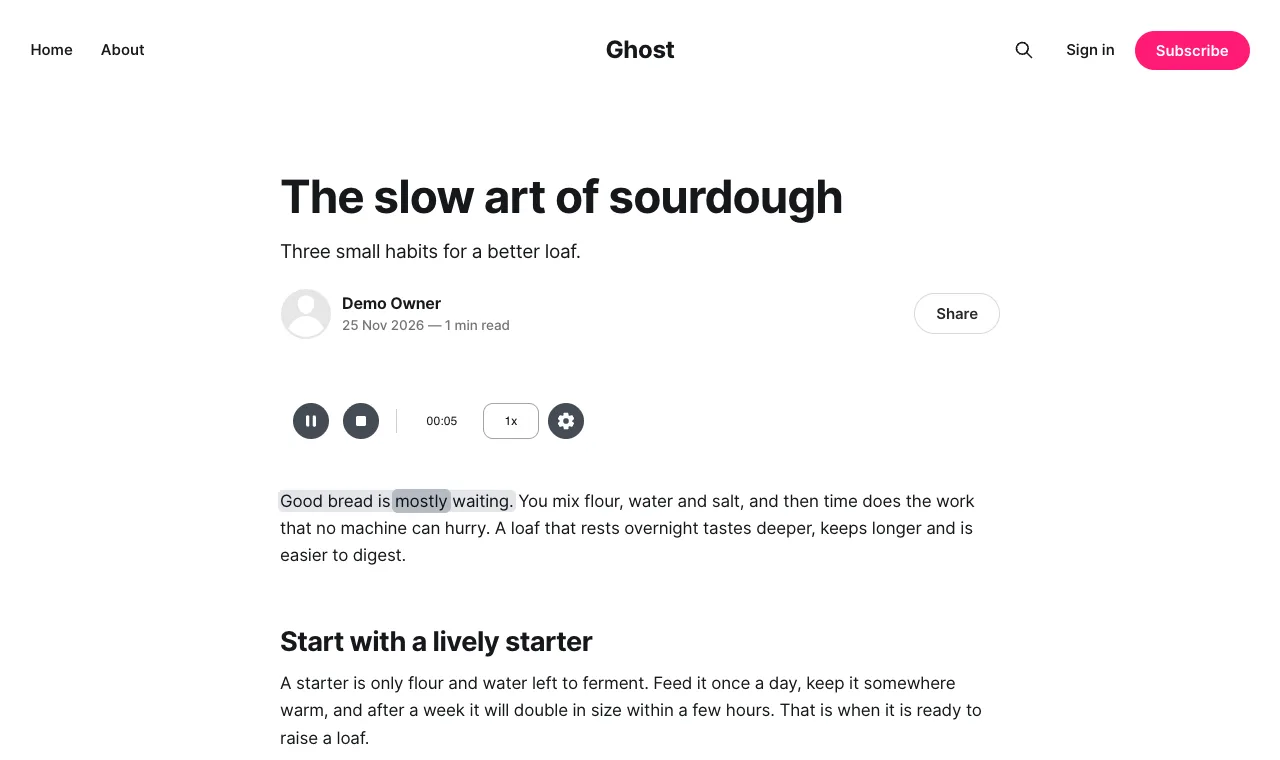
One snippet in Ghost adds a Listen button to every post. Natural AI voices read the post aloud and highlight each word as it is spoken.
40,000 characters free for 14 days. No credit card. No theme files to edit.
yourblog.ghost.io/the-slow-art-of-sourdough
The slow art of sourdough
Good bread is mostly waiting. You mix flour, water and salt, and then time does the work that no machine can hurry.
A loaf that rests overnight tastes deeper, keeps longer and is easier to digest.
Live demo: press play. This is the real player.
Three steps. No theme files to edit.
Tested on Ghost 6.79 with the Source and Casper themes.
Get your public site key
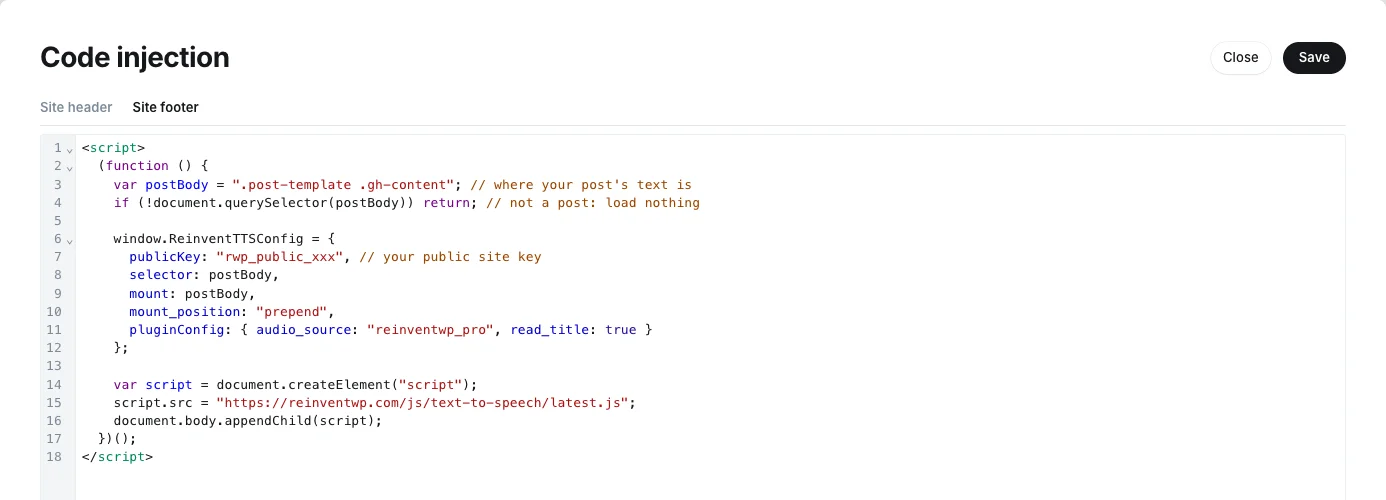
Paste the snippet into Ghost
<script>
  (function () {
    var postBody = ".post-template .gh-content"; // where your post's text is
    if (!document.querySelector(postBody)) return; // not a post: load nothing

    window.ReinventTTSConfig = {
      publicKey: "rwp_public_xxx", // your public site key
      selector: postBody,
      mount: postBody,
      mount_position: "prepend",
      pluginConfig: { audio_source: "reinventwp_pro", read_title: true }
    };

    var script = document.createElement("script");
    script.src = "https://reinventwp.com/js/text-to-speech/latest.js";
    document.body.appendChild(script);
  })();
</script>
Open a post
If something looks wrong
The player doesn't show up
Your theme may name the post's text differently. Ghost's own themes use gh-content. Open a post, right-click the first paragraph and choose Inspect, then find the element that wraps all the paragraphs. Put its class in the first line of the snippet, like this:
var postBody = ".post-template .your-class";It says the public key cannot be used on this domain
The key only works on the addresses you allowed. Open your project on the Text to Speech dashboard and add your blog's address, with your custom domain if you use one.
The player shows up late
A CDN or speed tool that delays JavaScript delays the player too. Exclude this snippet from it, or the address of the script:
reinventwp.com/js/text-to-speech/latest.jsI want it on pages too
The snippet only runs on posts. To add the player to pages as well, shorten the first line to:
var postBody = ".gh-content";Try it free. Pay when you're ready.
Get 40,000 hosted characters for 14 days. No credit card required.
Not ready to start?
Want a different player, voice or language?
Every setting of the JavaScript player works in this snippet. Build yours with the code generator.
Join our community.
Ask questions, share implementation issues, and help shape the next Text to Speech examples.
Need a custom solution?
Running a high-traffic website or planning an enterprise integration? We can help you fit the technology to your application.
reinventwp@gmail.com
Contact us
Tell us what you need. Include enough detail for us to understand your question and help you faster.
Prefer email? Write to support@reinventwp.com