
Reinvent Media Cleanup
WordPress Media Cleanup
Find and safely delete unused images and media files. Works with Elementor, Divi, ACF, WooCommerce and every page builder, for free.
Install Free PluginFree on WordPress.org. No account, no card.
Why Media Cleanup
Media Cleanup finds the images and files your site no longer uses and removes them safely, so your backups get smaller and your uploads folder stays tidy.
It reads your whole site, not just your posts
Page builders (Elementor, Divi, Beaver Builder, Bricks, Oxygen, Breakdance, WPBakery, Avada…), custom fields (ACF, Meta Box, JetEngine), WooCommerce galleries and categories, sliders, theme settings, widgets, menus, theme files and the CSS that builders generate. No extra add-on per plugin and nothing behind a paywall.
Nothing is deleted behind your back
Files go to a private trash first. Restore anything in one click.
The safety net
If a visitor, Google or an old newsletter asks for a file you trashed, Media Cleanup notices and puts it back automatically, then keeps it out of future results.
See it in action
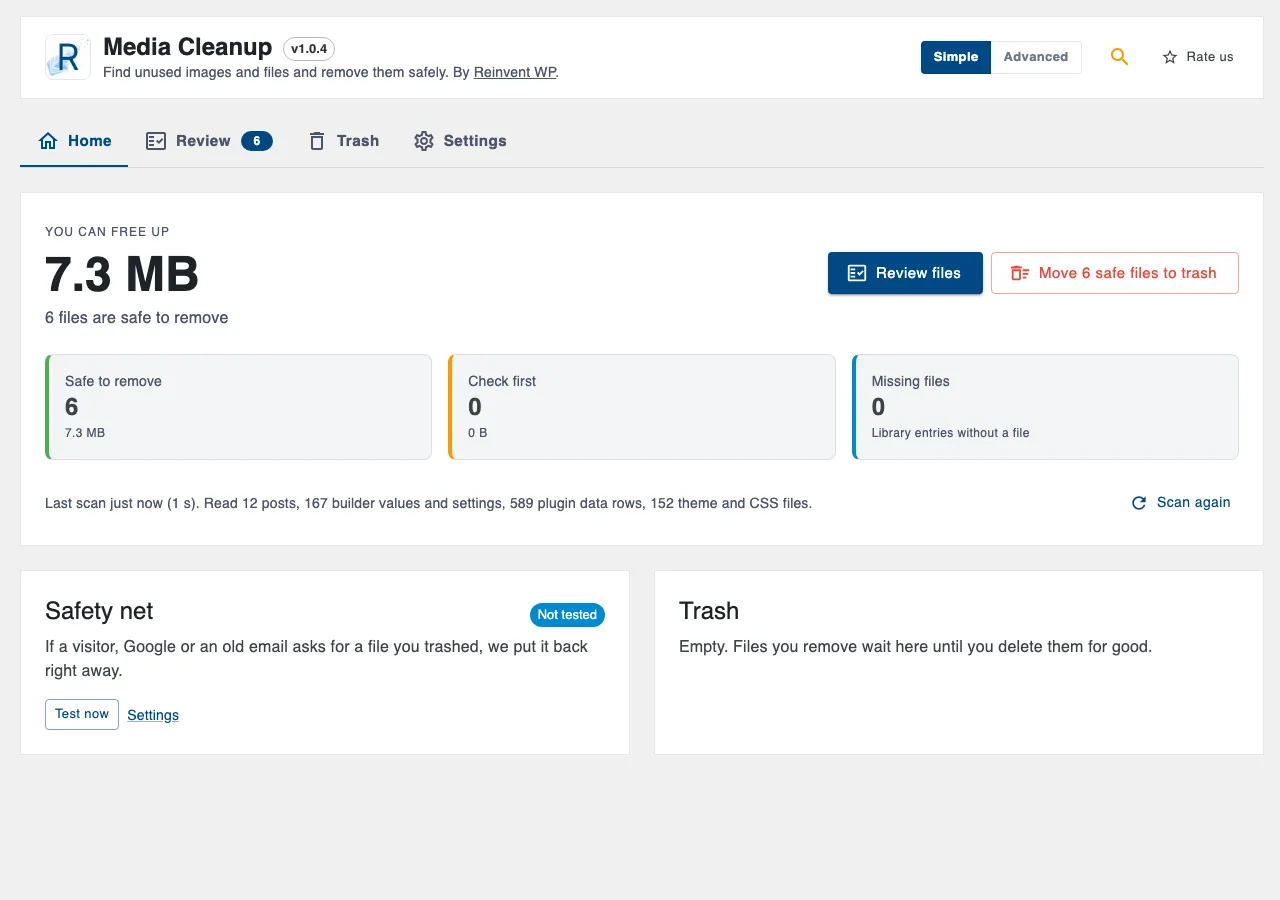
01
how much you can free up, and what to review first.
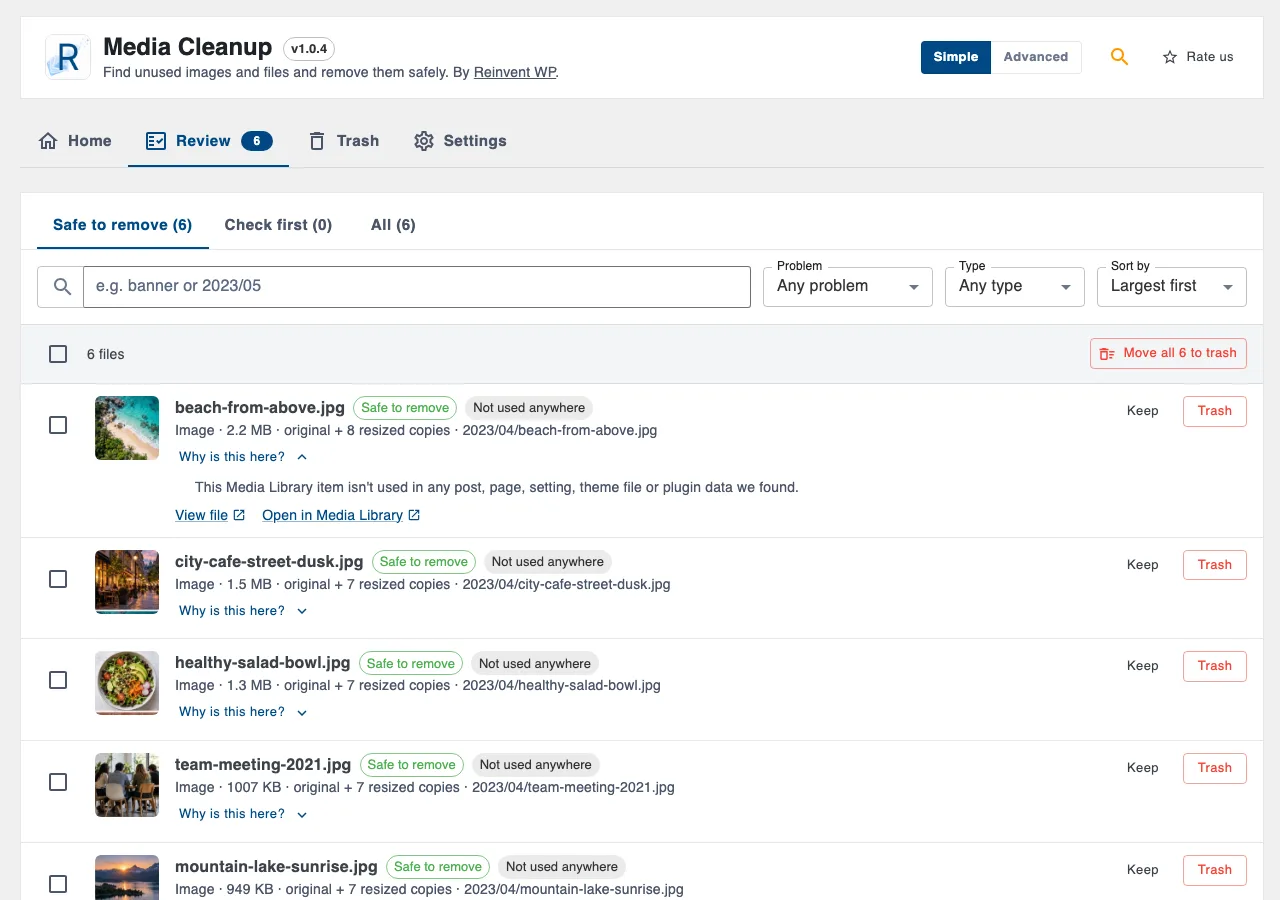
02
Review: every file with the reason it was flagged.
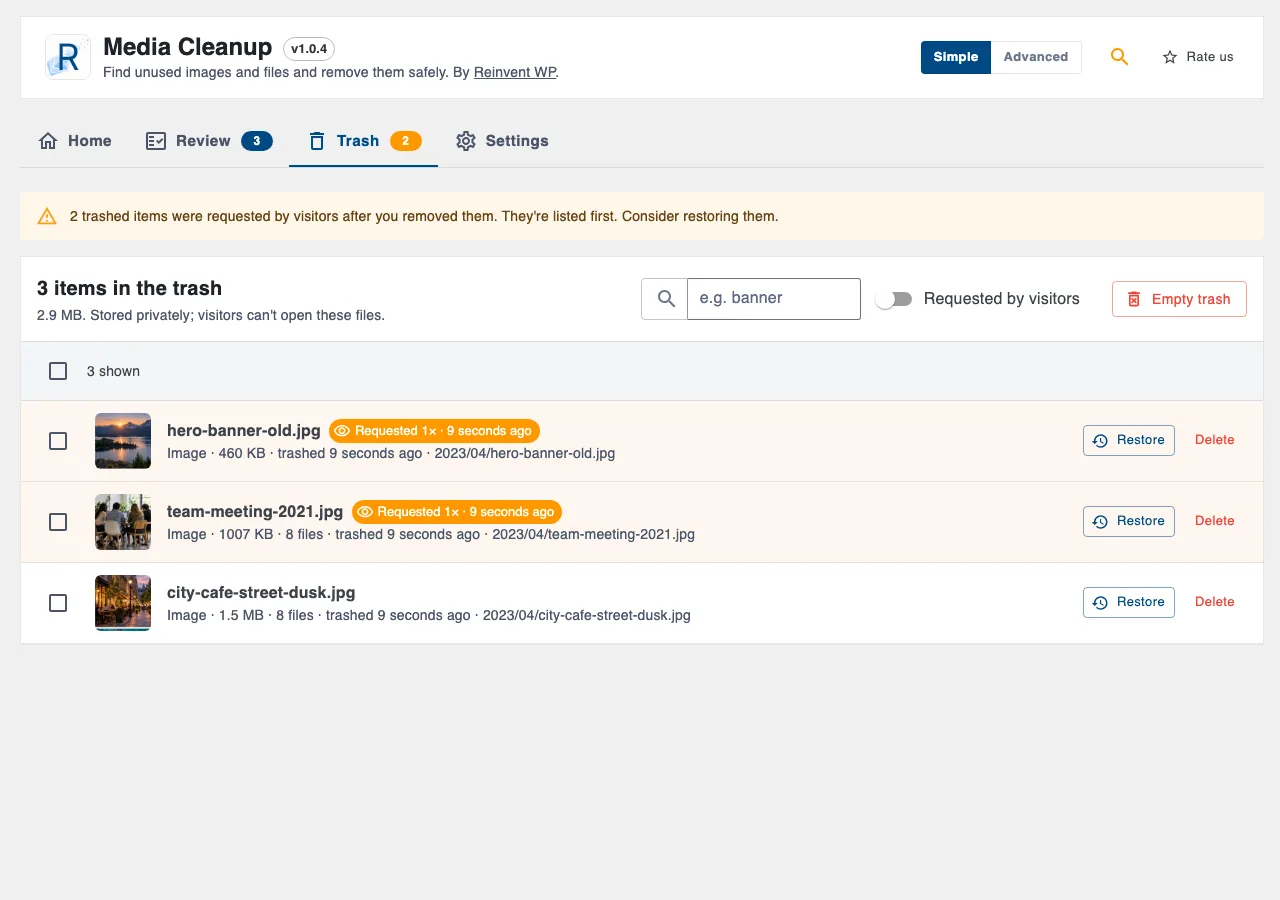
03
Trash: restore or delete for good, with visitor requests highlighted.
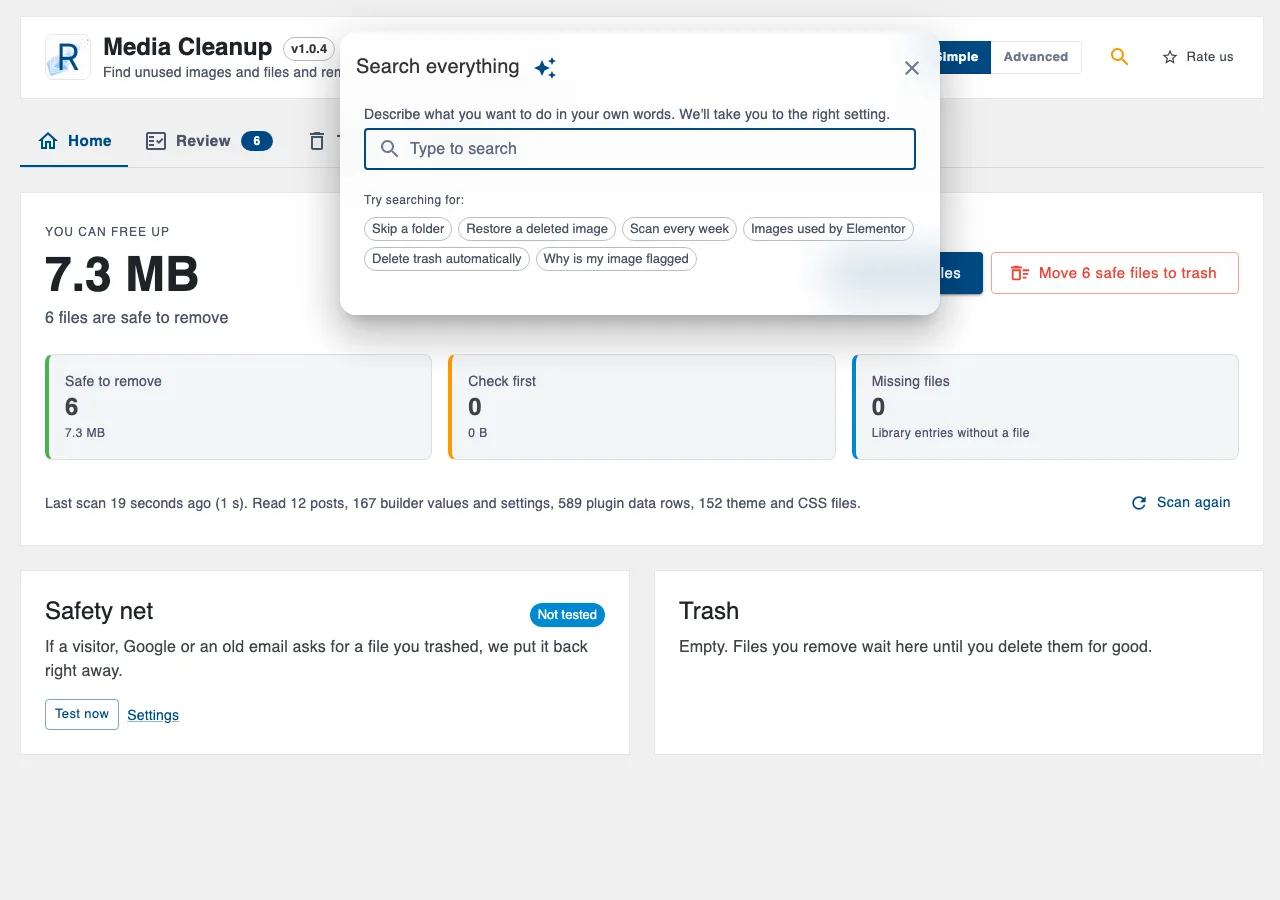
04
Settings search: describe what you want in your own words.
Add Media Cleanup to WordPress. Free.
Free on WordPress.org · No account · No card
Up and running in a minute
- 1
Install the plugin from Plugins → Add New (search for "Reinvent Media Cleanup"), or upload the zip.
- 2
Activate it. You land on Media → Cleanup.
- 3
Click Scan my site, then review the results.
Everything it does
Why it's different
Every builder supported, free. Instead of a parser per plugin, Media Cleanup reads post content, all post meta, options, term and user meta, comments, other plugins' database tables, theme files and generated CSS as plain text. If an image is referenced anywhere, it's kept.
Honest results. Each file is marked Safe to remove or Check first, with the reason in plain words: "Uploaded to *About us* but that page doesn't show it anymore", "Uploaded in the last 14 days", "PDFs are often linked from emails". If part of your site couldn't be read, results are marked "Check first" instead of guessing.
Uploads folder scan, free. Finds files that aren't in the Media Library, leftover WebP/AVIF copies of deleted images, and old thumbnail sizes nothing uses.
Safe by design. Never runs your shortcodes or page builder code during a scan. Re-checks posts you edited after the scan before moving anything.
Fast on big sites. The scan runs in small steps that fit your server's time limit, resumes after a timeout, and keeps going in the background if you close the page.
Simple or Advanced. Simple mode is one button and a list to review. Advanced mode adds the full scan report, every option, scheduled scans and an error log.
Search your settings in plain words. Type "skip a folder" or "restore a deleted image" and jump straight to the right setting.
Media Library "Usage" column. See where each image is used, from the last scan.
WP-CLI included.
wp media-cleanup scan,list,trash --all-safe,restore,empty-trash,usage.
Free features
Media Library scan with confidence levels and reasons
Uploads folder scan (orphan files, leftover WebP/AVIF/@2x copies, old thumbnail sizes)
Missing-file detection (library entries whose file is gone)
Private trash with previews, restore and permanent delete
Safety net with automatic restore and a server self-test
Optional automatic trash emptying after N days without visitor requests
Daily or weekly scheduled scans
Keep list (hide files you want to keep)
Scan report: what was read, plugins and tables found, anything skipped
Settings backup and restore
WP-CLI commands
Like any cleanup tool, keep a recent backup before deleting files permanently.
Questions and answers
The file and all its resized copies move to a private folder in wp-content that visitors can't open. The Media Library entry is hidden but kept. Restore puts everything back exactly where it was.
When someone requests a trashed file's URL, the request reaches WordPress because the file is missing. Media Cleanup recognizes the path, records the request and (by default) restores the file immediately. Use Test now on the Home screen to check your server supports it.
Yes. The scan works in small steps that fit your server's time limit and saves its progress after each one. Close the page and it continues in the background with WP-Cron, or run wp media-cleanup scan over SSH.
Each site is scanned on its own from its own Media → Cleanup screen.
The file looks unused, but there's a reason to look before removing it: it's still attached to a page, it was uploaded recently, it isn't an image (PDFs are often linked from emails), or part of your site couldn't be read.
Only what you type into the settings search, and error reports from the admin page. See External Services above.
More from Reinvent WP

Reinvent WP Text to Speech
Give your WordPress posts natural-sounding audio, synchronized highlighting, and a polished listening experience powered by modern web technology.

Reinvent Retina Images
Sharp retina images in one click: regenerate thumbnails, fix missing image sizes, turn off unneeded ones, make WebP/AVIF and free up space.

Reinvent Rename & Replace Media
Rename images and replace media files without breaking links. Updates links everywhere, keeps old URLs working and lets you undo.

Reinvent Database Cleaner
Clean and speed up your database safely. See which plugin left each table and option behind, and undo anything with built-in backups.

Reinvent Gallery Custom Links
Link each image in a gallery to any page or URL: products, case studies, partner sites. Works with Gallery blocks, Image blocks and classic galleries.

Reinvent Lightbox
A fast, accessible lightbox for images and galleries, with photo details (EXIF), slideshow, zoom, download and shareable links. All free.

Reinvent RSS Featured Image
Add featured images to your RSS feed, so Mailchimp, MailerLite, Feedly and other feed readers show a picture with every post. Free, no setup.

Reinvent Watermark
Add a text or logo watermark to your images on upload or in bulk, and remove it any time: the original is always kept.
Contact us
Tell us what you need. Include enough detail for us to understand your question and help you faster.
Prefer email? Write to support@reinventwp.com