
Reinvent Retina Images
WordPress Retina Images
Sharp retina images in one click: regenerate thumbnails, fix missing image sizes, turn off unneeded ones, make WebP/AVIF and free up space.
A free plugin, coming soon to WordPress.org.
Why Retina Images
Changed your theme? Added WooCommerce or a page builder? Your old images don't have the sizes the new design asks for, so pages show squeezed full-size images or blurry, badly cropped ones. Reinvent Retina Images fixes that in one click.
Fix my images
Checks every image, then makes only the sizes that are missing or out of date. Much faster than rebuilding everything, and it notices sizes whose dimensions changed, not just sizes that are missing.
Runs in the background, never times out
Works in small steps that fit your server's limits, resumes where it left off, and keeps going after you close the page. Large libraries are fine.
Image sizes, under control
See every size your theme and plugins create, how many images are missing it and how much space it uses. Turn off sizes you don't need, add your own, and set the big image limit.
Free up space, safely
Finds old sizes nothing uses anymore: sizes from your previous theme, leftovers and old JPEG copies after switching to WebP. Before moving a file we check your posts for it and keep anything still in use. Files go to a private trash first, so you can restore them in one click.
Sharp on retina screens
Turn on Retina 2× for a size and every image also gets a double-size copy. WordPress adds it to the image's srcset, so phones and high-density screens load the sharp one and other screens keep the small one. No extra scripts. Images too small for the double size keep the normal one; we never enlarge (upscale) a photo.
WebP and AVIF thumbnails
Make smaller, faster thumbnails with your server's own image library. Your original uploads are never touched.
See it in action
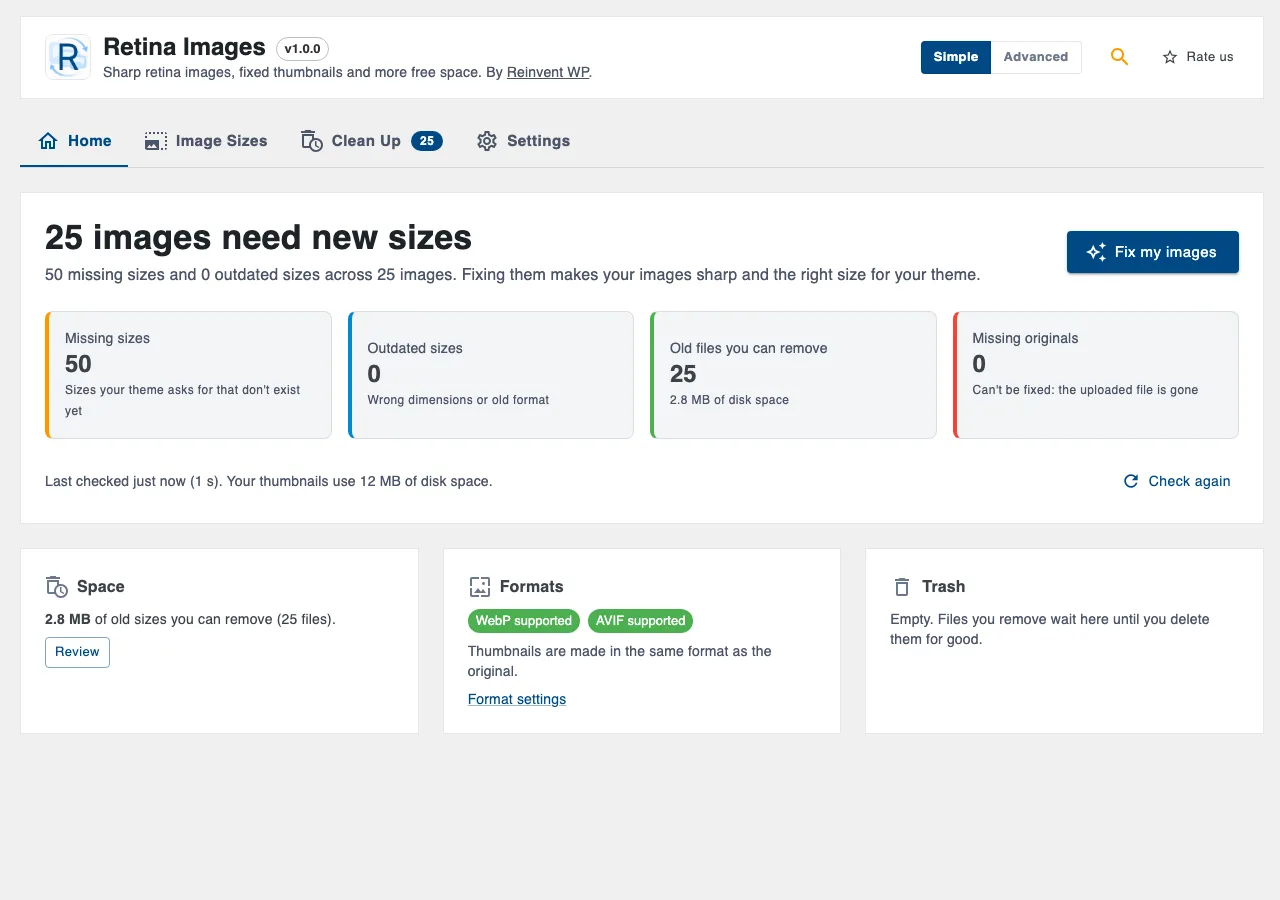
01
how many images need new sizes, fixed in one click.
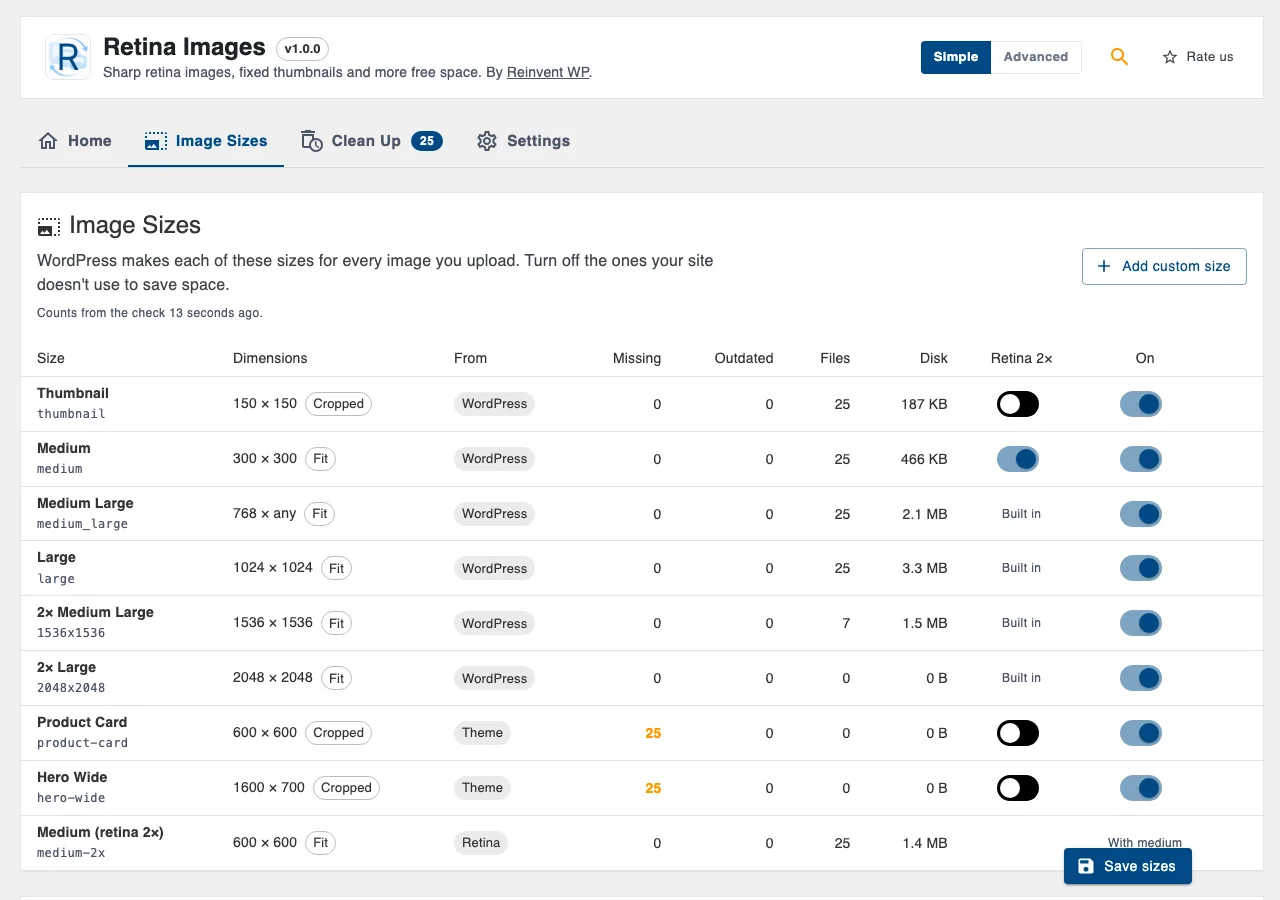
02
Image sizes: every size with its source, missing count, disk use and Retina 2× switch.
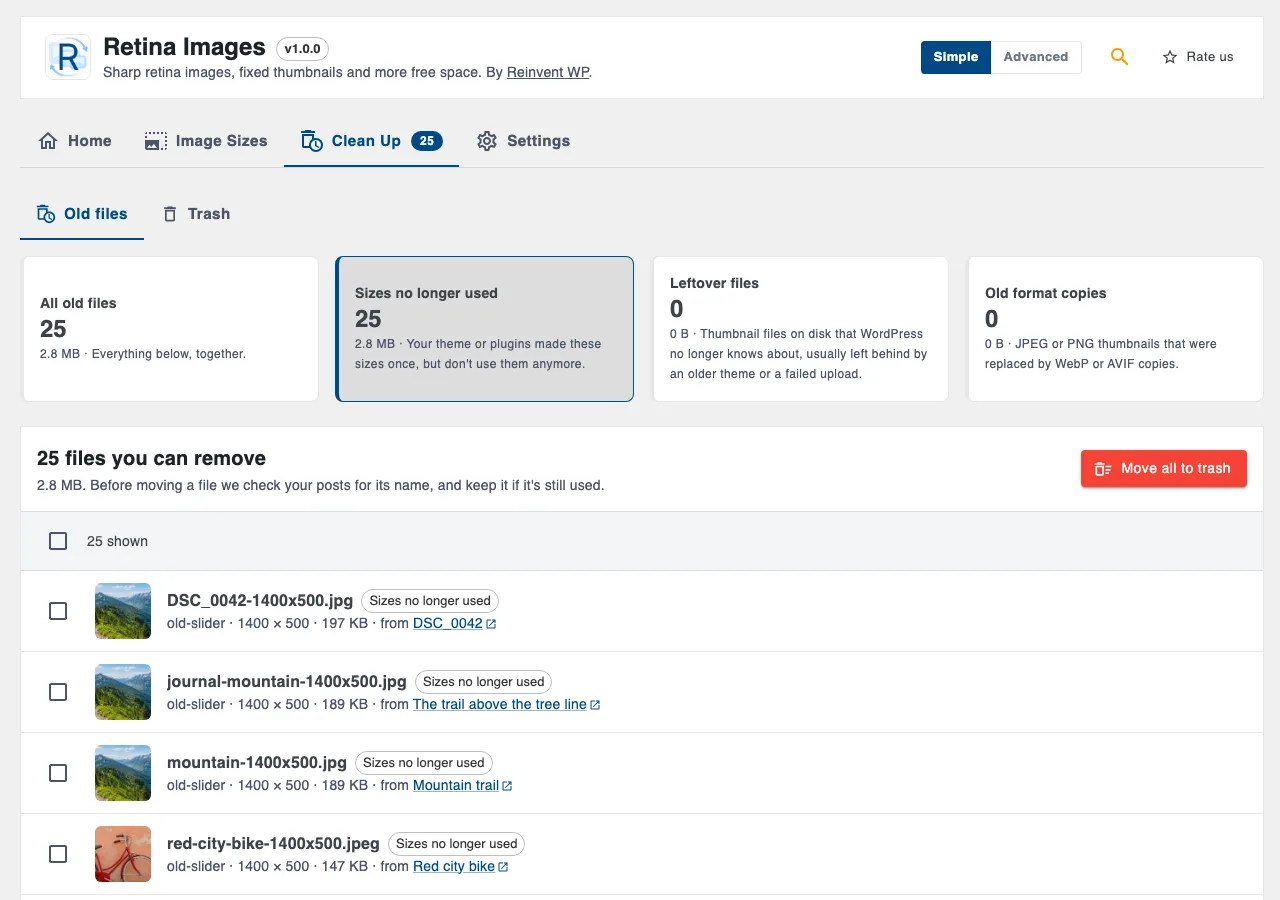
03
Clean up: old sizes you can remove, with undo.
Retina Images is coming soon
It will be free on WordPress.org. Want it sooner? Tell us what you need it for.
Tell us you want itOnce it is out
- 1
Install the plugin from Plugins → Add New, or upload the zip.
- 2
Activate it. You land on Media → Thumbnails.
- 3
Click Check my images, then Fix my images.
Everything it does
Everything is free
Fix missing and outdated sizes, or regenerate everything
Choose which images: all, featured images only, recent uploads, or a selection
Regenerate one image from the Media Library (row action, bulk action, or the button in the image details)
Image sizes overview with sources, missing counts and disk usage
Turn off sizes, add custom sizes, big image threshold
Retina 2× sizes, served by WordPress's own srcset, with a count of images too small for them
WebP/AVIF thumbnails with a quality setting
Clean up old sizes with a usage check and undo
Report of images that couldn't be processed and why
Simple and Advanced modes, plus a settings search that understands plain words
WP-CLI:
wp thumbnails-reinvent analyze,fix,regenerate,cleanup
Safe by design
Never touches your original upload or the edited version of an image.
Makes sizes from the original image, not the downscaled "-scaled" copy, and respects images you edited in WordPress.
Never deletes another image's file, even if its name looks like a thumbnail.
Removed files go to a private trash that visitors can't open, and can be restored with their image data.
Tip: keep a recent backup, like with any tool that changes files.
This plugin is made by Reinvent WP and is not affiliated with the "Regenerate Thumbnails" plugin or its authors.
Questions and answers
No. Only the resized copies (thumbnails) are made again. The original upload, the "-scaled" copy and images you edited in WordPress stay as they are.
"Fix my images" only makes sizes that are missing or whose dimensions or format changed. It's fast and usually all you need. "Regenerate everything" rebuilds every size from the original, which is useful after changing image quality or crop settings.
They stay unless you clean them up. The Clean Up screen lists them, checks that no post still links to them, and moves them to a private trash you can restore from.
Turn on Retina 2× for a size in Image Sizes. The plugin registers a double-size version (Medium 300×300 gets Medium 2× at 600×600), new uploads get it straight away, and Fix my images adds it to your existing images. WordPress lists it in the image's srcset, so the browser picks it only on screens that need it. Medium Large and Large are already doubled by WordPress itself (2× Medium Large and 2× Large), so they have no switch.
They are smaller than the double size. Enlarging them would only make a bigger file that looks just as soft, so WordPress skips them and the Image Sizes screen counts them as "too small".
Turn the switch off, run Check my images, and the 2× files show up in Clean Up, where you can move them to the trash and restore them if needed.
The plugin checks what your server's image library (GD or Imagick) can make and only offers formats it supports.
Yes. It works in small steps, saves its progress after each image and continues in the background with WP-Cron. You can also use WP-CLI.
More from Reinvent WP

Reinvent WP Text to Speech
Give your WordPress posts natural-sounding audio, synchronized highlighting, and a polished listening experience powered by modern web technology.

Reinvent Media Cleanup
Find and safely delete unused images and media files. Works with Elementor, Divi, ACF, WooCommerce and every page builder, for free.

Reinvent Rename & Replace Media
Rename images and replace media files without breaking links. Updates links everywhere, keeps old URLs working and lets you undo.

Reinvent Database Cleaner
Clean and speed up your database safely. See which plugin left each table and option behind, and undo anything with built-in backups.

Reinvent Gallery Custom Links
Link each image in a gallery to any page or URL: products, case studies, partner sites. Works with Gallery blocks, Image blocks and classic galleries.

Reinvent Lightbox
A fast, accessible lightbox for images and galleries, with photo details (EXIF), slideshow, zoom, download and shareable links. All free.

Reinvent RSS Featured Image
Add featured images to your RSS feed, so Mailchimp, MailerLite, Feedly and other feed readers show a picture with every post. Free, no setup.

Reinvent Watermark
Add a text or logo watermark to your images on upload or in bulk, and remove it any time: the original is always kept.
Contact us
Tell us what you need. Include enough detail for us to understand your question and help you faster.
Prefer email? Write to support@reinventwp.com